
Model
MiniMax H3 for clips that come with sound
MiniMax H3 is MiniMax’s video model for short clips with generated sound. Turn a product photo into video, or start from text or 2–3 reference images. Compare real Swayclip results below, then use the same prompt with your own images. H3 Max and Recast are not available on Swayclip.
Choose your input
Which MiniMax H3 mode should you use?
All three modes generate audio with the video. Swayclip offers 6 or 10 seconds at 768p or 2K; the examples below were tested at 6 seconds and 768p.
Text → video
Start without a photo for a scene or sound-led concept. Describe the subject, motion, camera and sound. It invents the appearance, so use a photo when exact product identity matters.
One photo → video
Upload one product photo as the starting frame, then describe restrained movement. The output follows the photo’s shape. It can alter fine details, labels or hinges; inspect every result before publishing.
2–3 reference images → video
Combine subject and setting references in one new scene. Describe the role of each image. References guide generation; they do not lock a first/last frame or guarantee exact identity. Swayclip accepts images only in this mode.
Real Swayclip test · October 2026
Candle product reveal
A single lit candle photo becomes a restrained product reveal. This unedited Swayclip output used one photo and the exact prompt below in our October 2026 benchmark.

- Setup
- One photo · 6 s · 768p
- Audio
- Generated · unmute to listen
- This attempt
- 118 s wait
Prompt
Slow cinematic orbit around the product, soft key light sweeping across its surface, gentle parallax in the background. The product stays sharp, correctly shaped and unchanged. No text, no logos, no people.
Current cost for these settings: 60 credits
Warm lighting and restrained motion worked in this run. This is one attempt, not a guarantee of identical shapes or audio on a new run.
H3, one-photo mode and 6 seconds are preselected. Upload your own product photo; the benchmark image is not loaded into your draft.
Real Swayclip test · October 2026
Coffee mug listing video
A mug source photo becomes a slow camera move with generated sound. This is an existing product test, not a tested cafe scene or a recording of real shop ambience.

- Setup
- One photo · 6 s · 768p
- Audio
- Generated · unmute to listen
- This attempt
- 179 s wait
Prompt
Slow cinematic orbit around the product, soft key light sweeping across its surface, gentle parallax in the background. The product stays sharp, correctly shaped and unchanged. No text, no logos, no people.
Current cost for these settings: 60 credits
Useful for a simple listing clip; sound is generated, not captured from the source photo. Specific cafe sounds were not tested in this case.
H3, one-photo mode and 6 seconds are preselected. Upload your own product photo; the benchmark image is not loaded into your draft.
Real Swayclip test · October 2026
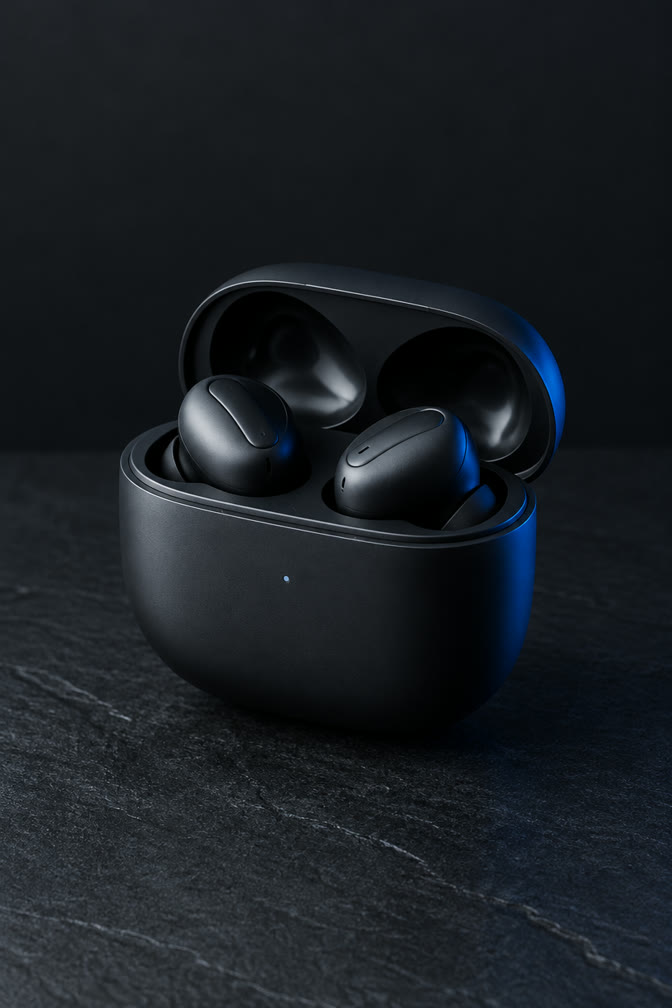
Earbuds case: where fine parts can fail
The same one-photo prompt also produced this earbuds clip. Compare the original case to the output before choosing H3 for a product with hinges or moving parts.
- Setup
- One photo · 6 s · 768p
- Audio
- Generated · unmute to listen
- This attempt
- 247 s wait
Prompt
Slow cinematic orbit around the product, soft key light sweeping across its surface, gentle parallax in the background. The product stays sharp, correctly shaped and unchanged. No text, no logos, no people.
Current cost for these settings: 60 credits
Observed failure point: the charging-case lid deformed slightly near the end. Do not use this output to claim precise mechanical movement.
H3, one-photo mode and 6 seconds are preselected. Upload your own product photo; the benchmark image is not loaded into your draft.
What MiniMax H3 costs in credits
Credits per second at each resolution, read from the same pricing table the generator charges from. The exact cost is also shown before every run.
| Model | Resolution | Credits per second | 6 s clip | 10 s clip |
|---|---|---|---|---|
| MiniMax H3 | 768P | 10 | 60 | 100 |
| MiniMax H3 | 2K | 15 | 90 | 150 |
Credits only. Audio is generated with every clip and cannot be switched off, so there is no separate audio charge.
Specs
Inputs, outputs and current limits on Swayclip
Credit cost, limits and example prompts stay next to the generator.
Prompt and uploads
Up to 7,000 prompt characters. Single-photo mode needs one image; reference mode needs 2–3. Use JPEG, PNG or WebP, up to 10 MB per image. Upload only images you have the right to use.
Clip settings
6 or 10 seconds, at 768p or 2K. Generated audio is always included. Our published examples and recovered three-mode success checks cover 768p; they are not a 2K quality benchmark.
Aspect ratios
Text mode: 16:9, 9:16, 1:1, 4:3 or 3:4. Single-photo mode follows the input. Reference mode also offers automatic aspect ratio.
Scope
Image references only: no source video or audio upload, voice cloning, Recast, H3 Max, video editing or finished-ad assembly. Add captions, branding and final audio edits separately.
MiniMax H3 prompts: start with the right mode
Tested · one-photo product orbit
“Slow cinematic orbit around the product, soft key light sweeping across its surface, gentle parallax in the background. The product stays sharp, correctly shaped and unchanged. No text, no logos, no people.”
Untested prompt idea · text cafe ambience
“Close-up of a ceramic cup on a cafe table, steam rising, soft street sounds and quiet cutlery clinks, shallow depth of field, slow push-in.”
Untested prompt idea · image references
“Use image 1 for the product and image 2 for the tabletop setting. Keep the product recognizable, slow camera push-in, soft room ambience. No text, no logos.”
MiniMax H3 questions
MiniMax H3 is a video generation model from MiniMax, the company behind the Hailuo series, and the newer generation of that line. On Swayclip it runs text-to-video, image-to-video and reference-to-video.
Describe the subject, one clear action, camera movement, lighting and the sound you want. With a product photo, describe motion rather than reinventing the product. For references, state what each image contributes. Keep complex hands, hinges and exact label text out of a first test; inspect the output because prompt instructions cannot guarantee fidelity.
It depends on length and resolution. The table on this page lists credits per second and the cost of a full clip, read from live pricing, and the generator shows the exact amount before you run.
Yes. Every clip includes an audio track generated by the model, and it cannot be turned off. If you need a silent clip, pick another model.
In our product-video test it kept shapes steady but showed small deformation on fine parts, such as a charging-case lid. Clips are 6 or 10 seconds long and took a few minutes to render. Treat it as one test, not a lab study.
Paid-plan and Credit Pack outputs can be used commercially within the paid entitlement scope, but you are responsible for rights in uploaded images, logos, and likenesses.
No. Swayclip is an independent creative tool that shows the real underlying model name.
The current standard signup offer is 50 credits for eligible new accounts; eligibility and abuse-prevention rules apply. That is below the cost of the shortest H3 clip shown in the live table, so the standard grant alone does not cover an H3 generation. Review your balance and the previewed cost before submitting. A $9 one-time pack adds 300 non-expiring credits without a subscription; subscriptions are another option. Failed generations refund credits automatically. Free-entitlement outputs are watermarked and for personal exploration.
No. H3 Max is a separate model variant in MiniMax’s official documentation. Swayclip currently exposes MiniMax H3 and its image-reference mode, not H3 Max. Do not assume the speed or resolution claims of H3 Max apply to these results.
No. Swayclip’s H3 reference mode generates a new clip from 2–3 images. It has no source-video upload or verified Recast workflow. Do not use it as a promise of character replacement or preserving an existing performance.
Ref2VA is MiniMax’s official reference-to-audio-video model variant. The official model supports broader multimodal references, including video and audio. On Swayclip, H3 reference mode currently takes only 2–3 images; those broader upload capabilities are not exposed here.
You can ask for box clicks, paper rustle or room ambience in a text prompt; H3 generates audio alongside video. These are generated sounds, not recordings or guaranteed timing. Our product examples test simple photo animation, not a complete unboxing or shop-ambience workflow. Listen to the result before using it.
Try MiniMax H3 on your own product photo
Upload a product photo and watch the clip with the sound on, or start from a short text brief. Credits are shown before you run.